All help topics
Account & billing
Webhooks, Zapier & API — connect your CRM, Slack, Google Sheets and more
Send calls, missed calls, voicemails, texts, WhatsApp messages, faxes and AI receptionist summaries to any app the moment they happen. Use Zapier, Make or n8n without code, or the REST API with an API key.
Callmacy can tell your other tools what’s happening on your numbers the moment it happens. For example, a missed call can post to Slack, a voicemail transcript can become a ticket in your helpdesk, and every text can be added to your CRM. There are three ways to connect:
| Best for | Coding needed | |
|---|---|---|
| Zapier, Make or n8n | Linking to 6,000+ apps (Slack, Google Sheets, HubSpot, Salesforce, Gmail, Trello…) | No |
| Webhooks | Sending events straight to your own system or server | A little |
| REST API | Sending texts, looking up numbers and reading calls from your own code | Yes |
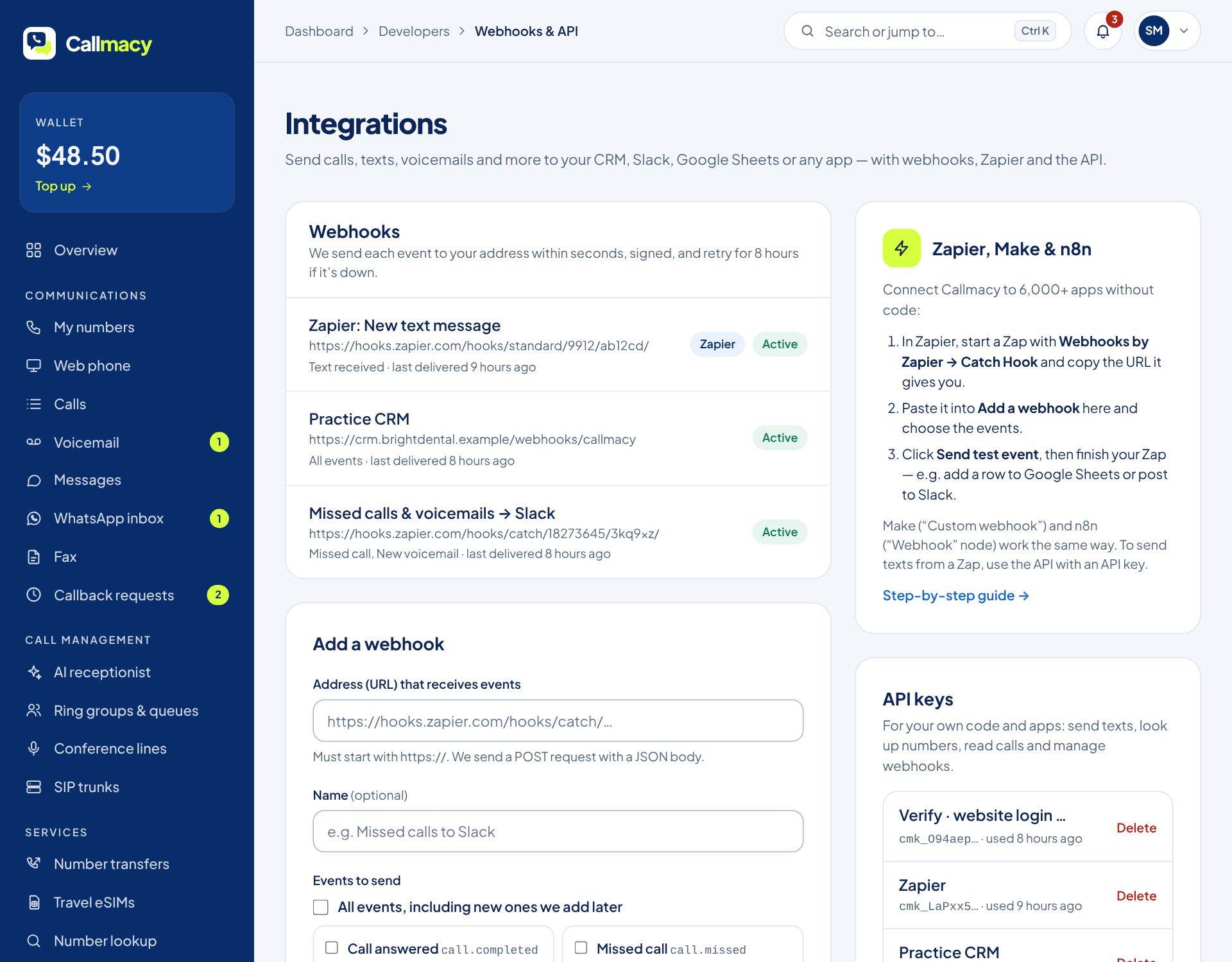
Everything lives under Integrations in the dashboard menu. The account owner and admins can use it; team members can’t.
Events you can send
| Event | Name in the payload | When it fires |
|---|---|---|
| Call answered | call.completed |
A call to or from your numbers was answered and has ended |
| Missed call | call.missed |
Someone called and nobody answered |
| New voicemail | voicemail.received |
A caller left a voicemail. Includes the transcript and an audio link |
| Text received | sms.received |
An SMS arrived on one of your numbers |
| WhatsApp received | whatsapp.received |
A WhatsApp message arrived |
| Fax received | fax.received |
A fax arrived. Includes a link to the PDF |
| Fax delivered / failed | fax.delivered / fax.failed |
A fax you sent was delivered, or couldn’t be |
| Callback request | widget.callback_requested |
A website visitor asked to be called back through your call widget |
| AI receptionist call | ai.call_summary |
The AI receptionist finished a call. Includes the caller’s name, callback number, reason, urgency and a summary |
| Low balance | wallet.low_balance |
Your wallet balance dropped below your low-balance alert |
Audio and PDF links in events are private links that work for 7 days, so your tools can save the file.
Zapier (no code)
- In Zapier, click Create Zap. Choose Webhooks by Zapier as the trigger and pick Catch Hook. Copy the URL Zapier shows you.
- In Callmacy, open Integrations → Add a webhook. Paste the URL, give it a name (e.g. Missed calls to Slack) and tick the events you want — for example Missed call and New voicemail. Click Add webhook.
- Click Send test event. Back in Zapier, click Test trigger — you’ll see a sample missed call with fields like
data from,data number_labelanddata duration_seconds. - Add your action, e.g. Slack → Send Channel Message: “Missed call from {{data from}} on {{data number_label}}”. Turn the Zap on.
Ideas:
- Missed call → Slack message, or a task in Asana/Trello to call back.
- New voicemail → email the transcript to the right person, or create a Zendesk/Freshdesk ticket.
- Every call → a row in Google Sheets for reporting.
- AI receptionist call → a lead in HubSpot, Pipedrive or Salesforce with the caller’s name, number and reason.
- New text → a Microsoft Teams message.
Sending texts from a Zap: add a Webhooks by Zapier → POST action:
- URL:
https://callmacy.com/api/v1/messages - Payload type: json
- Data:
from,to,text - Header:
Authorization: Bearer YOUR_API_KEY
Make and n8n work the same way. In Make, use a Webhooks → Custom webhook module. In n8n, use a Webhook node. Paste the address they give you into Add a webhook.
Webhooks for your own system
When an event happens, we send an HTTPS POST with a JSON body to your address:
{
  "id": "evt_01jf3k8w9q2m4x7v",
  "type": "call.missed",
  "created_at": "2026-11-25T09:30:00+00:00",
  "data": {
    "call_id": 1042,
    "direction": "inbound",
    "status": "missed",
    "from": "+14155550123",
    "to": "+14155550174",
    "number": "+14155550174",
    "number_label": "Front desk",
    "duration_seconds": 0,
    "queue": "Reception",
    "dashboard_url": "https://callmacy.com/app/calls"
  }
}
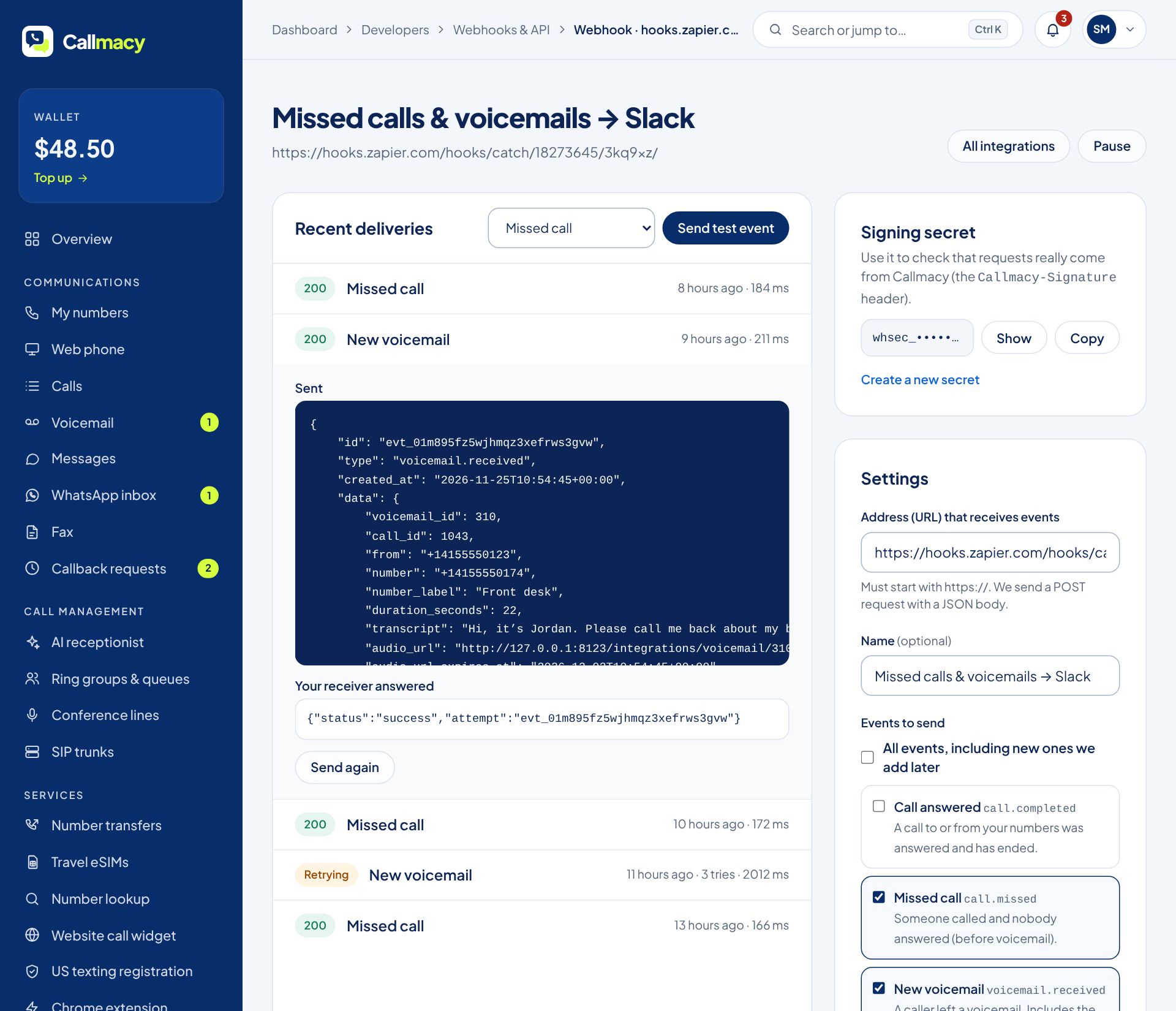
Each webhook’s page shows the exact payload for every event (open any delivery). Use Send test event to send an example of any event type.
Your receiver should:
- Answer with any 2xx status within 10 seconds. Do slow work after you answer.
- Expect the same event more than once now and then. Use
idto skip events you’ve already handled. - Use the final address. We don’t follow redirects.
Retries. If your address is down or answers with an error, we try again after 1 minute, 5 minutes, 30 minutes, 2 hours and 6 hours (6 tries in all). Every try is logged on the webhook’s page, with the status code and what your server answered. You can Send again any delivery. If 20 deliveries in a row fail, we pause the webhook and email you. Switch it back on when it’s fixed. If an address answers 410 Gone, we treat it as unsubscribed.
Security. Addresses must use https:// on the public internet. We never send to private or internal networks.
Check the signature
Every request carries these headers:
Callmacy-Event— the event type, e.g.call.missedCallmacy-Event-IdCallmacy-Signature: t=1764063000,v1=5f2c…
v1 is an HMAC-SHA256 of t + "." + raw body, keyed with your webhook’s signing secret (whsec_…, on the webhook’s page). Reject requests whose signature doesn’t match, or whose t is more than 5 minutes old.
PHP:
$body = file_get_contents('php://input');
[$t, $v1] = sscanf($_SERVER['HTTP_CALLMACY_SIGNATURE'], 't=%d,v1=%s');
$ok = hash_equals(hash_hmac('sha256', $t.'.'.$body, getenv('CALLMACY_WEBHOOK_SECRET')), $v1) && abs(time() - $t) < 300;
Node.js (Express — use the raw body):
const crypto = require('crypto');
app.post('/callmacy', express.raw({ type: 'application/json' }), (req, res) => {
  const [, t, v1] = req.get('Callmacy-Signature').match(/t=(\d+),v1=([a-f0-9]+)/);
  const expected = crypto.createHmac('sha256', process.env.CALLMACY_WEBHOOK_SECRET).update(`${t}.${req.body}`).digest('hex');
  if (!crypto.timingSafeEqual(Buffer.from(expected), Buffer.from(v1))) return res.sendStatus(401);
  const event = JSON.parse(req.body);
  res.sendStatus(200); // answer first, then do the work
});
Python (Flask):
import hmac, hashlib, os, re
from flask import request, abort
t, v1 = re.match(r't=(\d+),v1=([a-f0-9]+)', request.headers['Callmacy-Signature']).groups()
expected = hmac.new(os.environ['CALLMACY_WEBHOOK_SECRET'].encode(), f'{t}.'.encode() + request.get_data(), hashlib.sha256).hexdigest()
if not hmac.compare_digest(expected, v1): abort(401)
Lost the secret, or someone saw it? Click Create a new secret on the webhook’s page. The old one stops working at once.
REST API
Base address: https://callmacy.com/api/v1
- Create an API key under Integrations → API keys. Give it a name, such as CRM. The key starts with
cmk_and is shown only once, so copy it straight away. - Send the key with every request as
Authorization: Bearer cmk_…(orX-API-Key: cmk_…).
A key acts for the whole account. Keep it secret: anyone who has it can send texts and run lookups that are paid from your wallet. Delete a key you no longer need and it stops working instantly. Each key can make 120 requests a minute; sending texts and lookups are limited to 30 a minute.
| Method & path | What it does |
|---|---|
GET /me |
Checks the key; returns your account name, email and balance |
GET /numbers |
Your numbers, with label, country, type and SMS ability |
GET /calls?limit=25&status=missed |
Recent calls (same fields as the call events) |
POST /messages |
Sends a text: {"from": "+14155550174", "to": "+447700900123", "text": "Hi!"} |
POST /lookups |
Looks up a number: {"number": "+14155550123", "caller_name": true} |
POST /verifications · POST /verifications/check |
Sends a one-time login code and checks it — see Verify API |
GET /events |
Lists the event types |
GET /events/{type}/samples |
Your latest real events of that type, or an example |
GET /webhooks · POST /webhooks · DELETE /webhooks/{id} |
Manage webhooks from code: {"url": "https://…", "events": ["call.missed"]} |
Send a text with curl:
curl https://callmacy.com/api/v1/messages \
  -H "Authorization: Bearer $CALLMACY_KEY" \
  -H "Content-Type: application/json" \
  -d '{"from":"+14155550174","to":"+447700900123","text":"Your appointment is confirmed for 3pm."}'
Texts and lookups cost the same as in the dashboard and are paid from your wallet. If something is wrong, the API answers 422 with a plain-English message, for example: the number isn’t yours, the number can’t send texts, or your balance is too low. Missing or wrong keys get 401, and suspended accounts get 403.
Texts to one address (older option)
On a number’s page, Send texts to my webhook still forwards that number’s incoming texts to one address. For new set-ups, use Integrations: it covers every event and every number, with retries and a delivery log.
Troubleshooting
- “The receiver answered 404/401.” Check the address, and that your server accepts POST requests without a login.
- “Could not connect.” Your server is down, too slow (over 10 seconds), or its HTTPS certificate is invalid.
- “The address redirected.” Use the final address, for example with
www.or a trailing slash. - The webhook is paused. 20 deliveries in a row failed. Fix the receiver, then click Switch on.
- Duplicate events. Use the event
idto ignore repeats.
Related: Team accounts · SMS · Voicemail · AI receptionist
Still stuck?
Email [email protected] or send us a message — we usually reply within one business day.
Related guides
Wallet, top-ups, auto top-up and invoices
How the prepaid wallet works, auto top-up with your saved card, renewal reminders, invoices and exporting your transactions.
Documents and verification
Why some countries need ID or proof of address, and how to upload documents once for all your numbers.
Plans — Starter, Business and AI Plus, trials, upgrades and renewals
What each plan includes, the free trial, paying by card or from your wallet, what happens if a payment fails, and how to upgrade, downgrade or cancel.
Account settings, mobile verification and two-factor login
Change your name, email and password, verify your mobile number with a one-time code, and protect your wallet with two-factor authentication.