All help topics
Account & billing
Verify API — send login codes by SMS, WhatsApp or voice call
Check that your users own their phone number. Send a one-time code by SMS, WhatsApp or voice call and check it with one API call — for sign-ups, logins, password resets and payments.
Verify sends one-time codes to your own users — when they sign up, log in, reset a password or confirm a payment — and tells you whether the code they typed is right. You don’t need your own number, sender ID or WhatsApp account: Callmacy delivers the code and keeps track of it for you.
Your users see a message like this:
Your Bright Dental verification code is: 482915.
What it costs
| Price | |
|---|---|
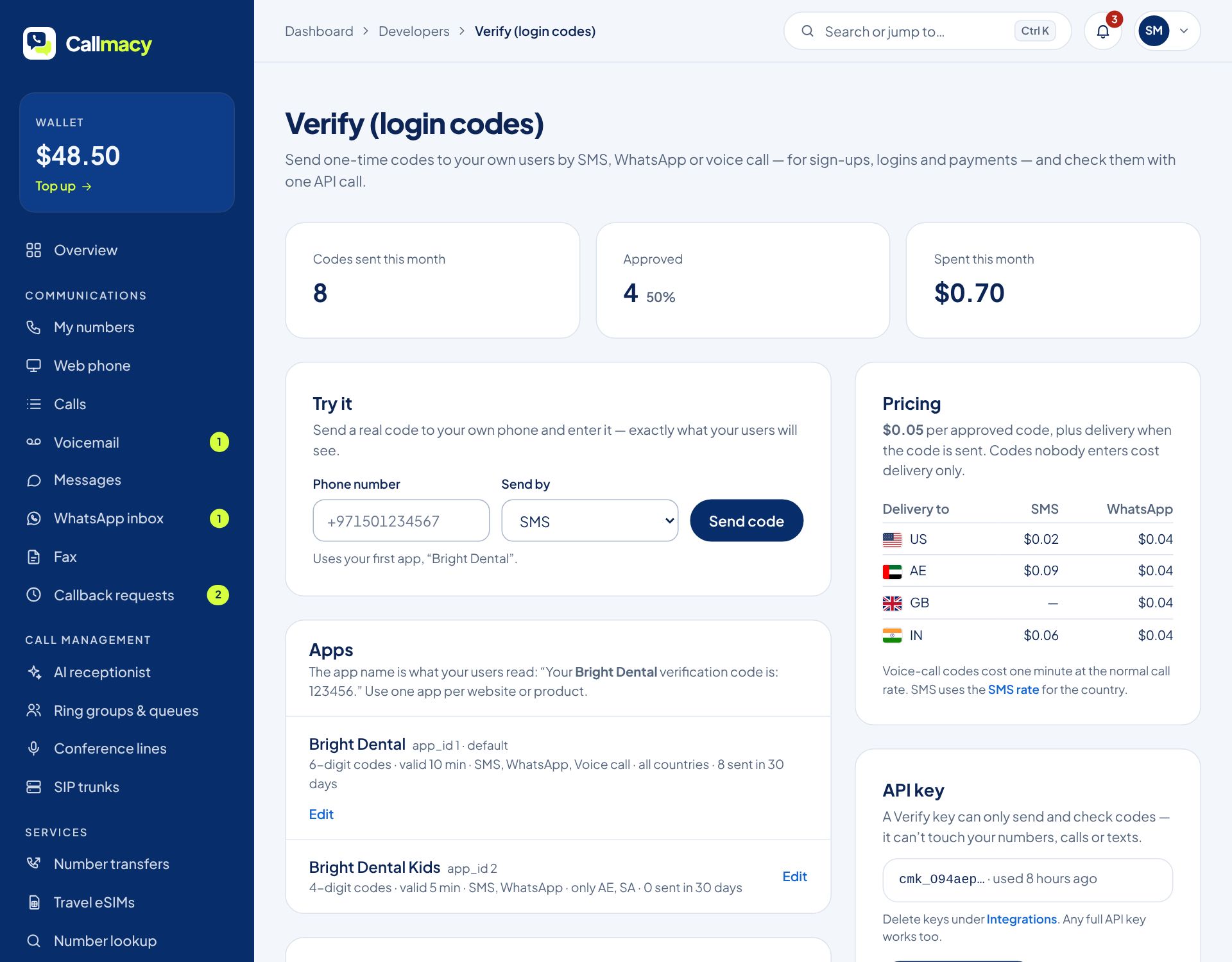
| Verification fee | $0.05 per code that’s approved (typed correctly) |
| SMS delivery | The normal SMS price for the country, charged when the code is sent |
| WhatsApp delivery | $0.04 per code, any country |
| Voice-call delivery | One minute at the normal call rate for the country |
A code that nobody types in costs only its delivery. If a code can’t be sent, you get the delivery charge back straight away. The Verify page shows the prices for popular countries, and Codes sent lists the charge for every code.

Get started in 3 steps
- Open Verify (login codes) in the menu. Your first app is ready, named after your company.
- Click Create a Verify key and copy it. It is shown only once.
- Use the Try it box to send a code to your own phone and type it in. That’s exactly what your users will see.
Then add the two API calls below to your website or app.
The API
Send requests to https://callmacy.com/api/v1 with your key in the Authorization: Bearer cmk_… header.
1. Send a code when the user enters their number:
POST /api/v1/verifications
to=+971501234567
channel=sms            (sms, whatsapp or call — optional, sms by default)
app_id=12              (optional — your first app is used if you leave it out)
The answer includes an id (e.g. vrf_01jd…), status: "pending" and expires_at.
2. Check the code the user typed:
POST /api/v1/verifications/check
to=+971501234567
code=482915
or POST /api/v1/verifications/{id}/check with code. The answer looks like this:
{"data": {"id": "vrf_01jd…", "to": "+971501234567", "channel": "sms",
  "status": "approved", "valid": true, "attempts_left": 0,
  "message": "The code is correct."}}
Let the user in only when status is approved. Other answers:
status |
What it means | What to show your user |
|---|---|---|
pending |
The code was wrong; they can try again (attempts_left says how many times). |
“That code isn’t right.” |
failed |
5 wrong codes — this code no longer works. | “Too many tries — send a new code.” |
expired |
The code is older than the expiry time you set. | “The code has expired — send a new one.” |
canceled |
A newer code was sent to the same number. | “Use the latest code we sent.” |
Other endpoints: GET /api/v1/verifications/{id} returns a code’s status, and GET /api/v1/verify/apps lists your apps and their ids.
Apps
An app holds the settings for one website or product:
- Name in the message — your brand, up to 30 letters, numbers, spaces or dashes.
- Code length — 4 to 10 digits (6 is standard).
- Expiry — 2 to 60 minutes.
- Channels — SMS, WhatsApp and voice call. Turn off any you don’t want to offer.
- Countries — optionally, only send to the countries you serve, for example
AE, SA, GB.

Create one app per brand, for example your website and your mobile app. Pass app_id in the API to choose one.
Channels
- SMS works for every mobile in the countries we text. It’s the best default.
- WhatsApp is often cheaper and more reliable outside the US, and the message has a Copy code button. The code comes from Callmacy’s verified WhatsApp business account.
- Voice call reads the code out loud. Use it for landlines or when a text doesn’t arrive.
A good sign-in screen offers “Didn’t get it? Send by WhatsApp / Call me instead”. Each choice is a new POST /verifications request with a different channel.
Built-in protection
- Codes are stored safely. We keep only an encrypted fingerprint of each code, never the code itself.
- 5 tries per code. After 5 wrong codes, that code stops working.
- Resend limits. A number can get a new code once every 30 seconds and up to 5 times an hour. Each new code replaces the last one.
- Daily cap. Each account can send up to 1,000 codes a day. Contact us if you need more.
- Country limits. Fake sign-ups sometimes send codes to expensive numbers in other countries to run up your bill. If you only have users in a few countries, list them in your app.
Verify keys
A Verify key can only send and check codes. It can’t read your calls, send texts or change your numbers. That makes it safe to put on the server that handles your logins. Any full API key from Integrations works too. You can delete keys under Integrations.
Troubleshooting
- “We can’t send SMS codes to that country yet” — try
channel=whatsapporcall, or ask us to open that country. - The code doesn’t arrive — check the number is in international format with the country code. Then try WhatsApp or a voice call. Codes that fail to send are refunded.
- WhatsApp shows “coming soon” — WhatsApp codes are turned on once Meta approves our login-code message. SMS and voice calls work in the meantime.
- “Your balance is too low” — top up your wallet, or turn on auto top-up so logins never stop.
Related: Webhooks, Zapier & API · Number lookup · Wallet & billing
Still stuck?
Email [email protected] or send us a message — we usually reply within one business day.
Related guides
Wallet, top-ups, auto top-up and invoices
How the prepaid wallet works, auto top-up with your saved card, renewal reminders, invoices and exporting your transactions.
Documents and verification
Why some countries need ID or proof of address, and how to upload documents once for all your numbers.
Plans — Starter, Business and AI Plus, trials, upgrades and renewals
What each plan includes, the free trial, paying by card or from your wallet, what happens if a payment fails, and how to upgrade, downgrade or cancel.
Account settings, mobile verification and two-factor login
Change your name, email and password, verify your mobile number with a one-time code, and protect your wallet with two-factor authentication.