All help topics
Calls
Ring groups and call queues
Share calls across your team. Ring several phones together or in turn, or hold callers in a queue with music until someone is free.
When more than one person answers the phone, use a ring group or a call queue. Both live under Ring groups & queues in the menu. Set one up once, then use it on any number or phone-menu option.
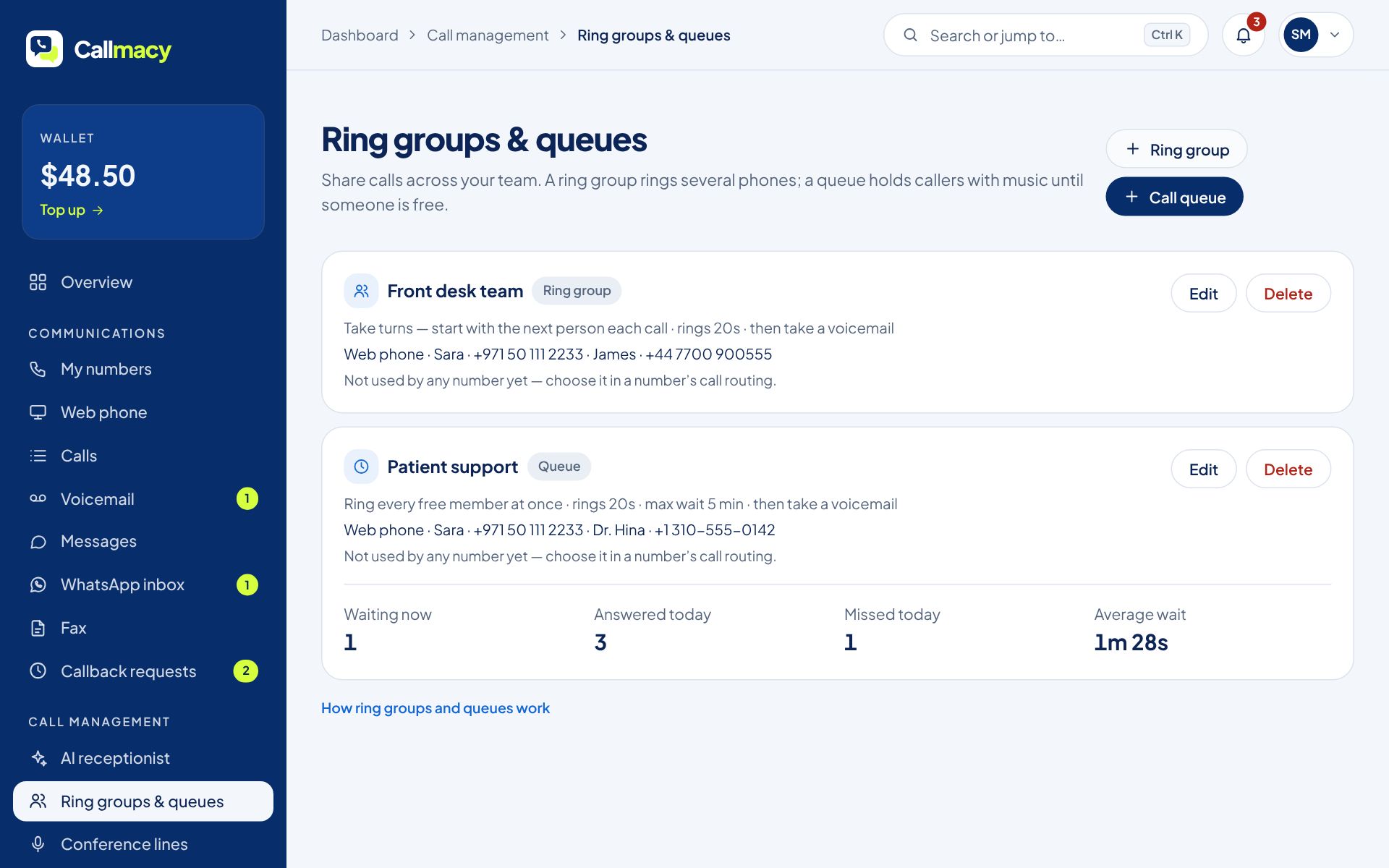
Ring group or queue?
| Ring group | Call queue | |
|---|---|---|
| What callers hear | Ringing | A welcome message, hold music and their place in line |
| If everyone is busy | Goes to voicemail (or your choice) after the ring time | Waits in line, up to the longest wait you set |
| Best for | Small teams, “ring the office and my mobile” | Support and sales lines that get several calls at once |
Create a ring group
- Open Ring groups & queues and click Ring group.
- Give it a name, such as Sales team.
- Add members: any phone number (with a name so you know who’s who), the owner’s web phone, a team member (rings that colleague’s own web phone — see Team accounts), or a SIP trunk. Up to 10.
- Choose the ring order:
- All at once — every phone rings; the first to answer gets the call.
- One after another — in the order listed, each for the ring time you choose.
- Take turns — like one after another, but each new call starts with the next person, so calls are shared fairly.
- Choose what happens if nobody answers: voicemail, the AI receptionist, or a polite goodbye.
Create a call queue
- Click Call queue and add the members who take calls.
- Choose how calls are offered: ring every free member at once, or in turn (one free member at a time, rotating).
- Write a welcome message, choose the longest a caller waits (1 to 30 minutes) and what happens after that.
- Leave Tell callers their place in line on — callers hear “You are number 2 in line” between music.
- Optional: link your own hold music (an MP3 you have the rights to). Otherwise callers hear our calm default music.
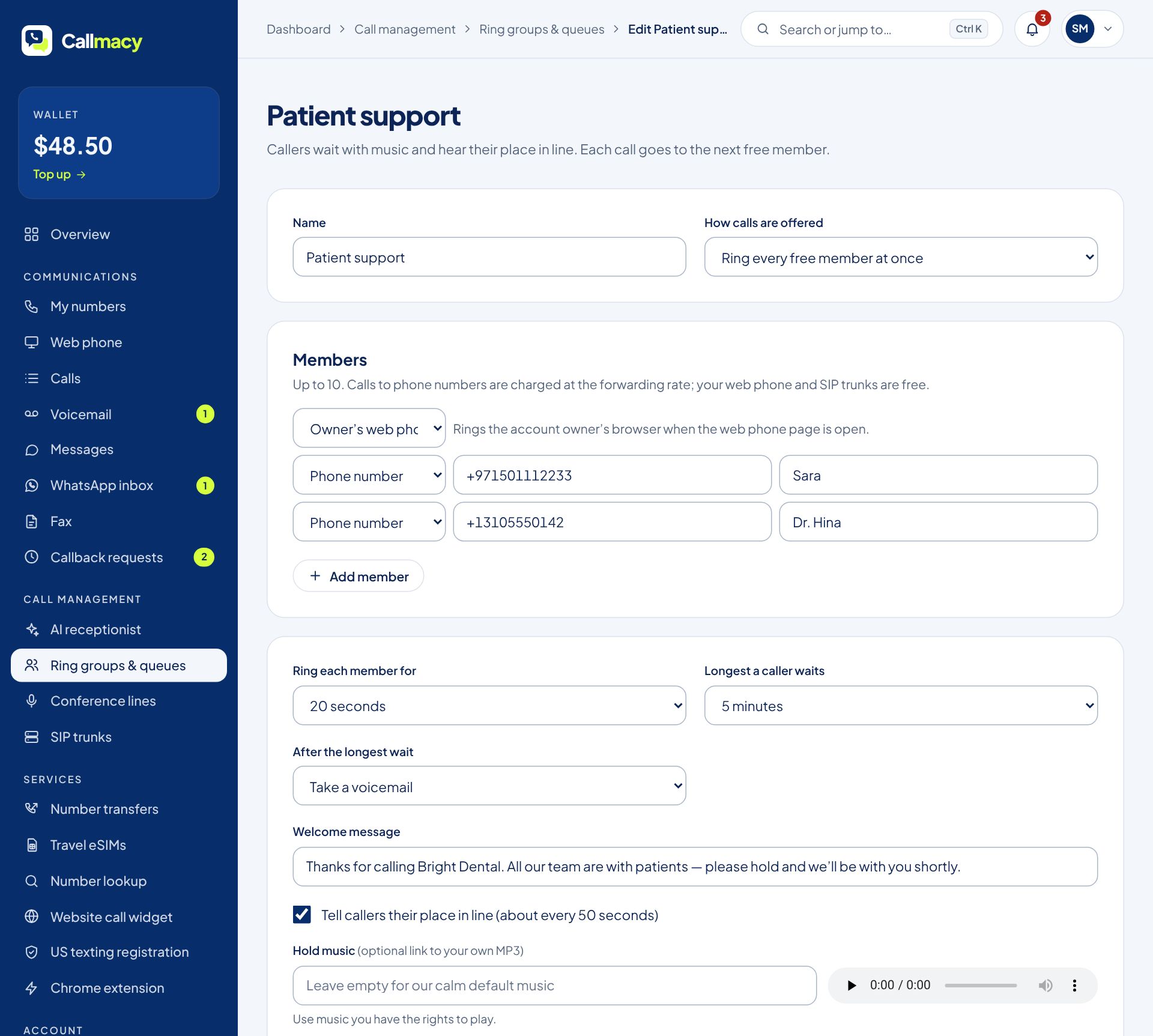
How the queue works: the caller who has waited longest is always offered first. Members who are already on a call, or ringing for someone else, aren’t disturbed — the next caller goes to them as soon as they hang up.
Use it on a number
- Open My numbers and choose the number.
- Under When someone calls, choose Ring group or Call queue, then pick it in the list below.
- Click Save.
You can also use them in a phone menu: set an option’s action to Ring a group or Send to a call queue (e.g. “Press 1 for sales” → Sales team, “Press 2 for support” → Support queue).
Business hours, greetings and call recording on the number still apply.
Queue numbers at a glance
Each queue shows how many callers are waiting now, and today’s answered, missed and average wait. Every call also appears in Calls, where queued calls show as On hold in queue while they wait.
Costs
Ring groups and queues are free to use. Ringing a member’s phone number is charged at the normal forwarding rate for the time they’re connected; your web phone and SIP trunks cost nothing extra. Time a caller spends on hold counts as normal incoming minutes on your number.
Example setups
Small office — ring group Office: web phone + two mobiles, all at once, 20 seconds, then voicemail. Point your main number at it.
Sales team that shares leads fairly — ring group Sales, take turns. Each new caller starts with the next salesperson.
Support line — call queue Support: three members, ring every free member at once, 5-minute longest wait, then voicemail, place in line on. Use it as option 2 of your phone menu.
After-hours cover — business hours on the number; inside hours go to the queue, outside hours to the AI receptionist.
Troubleshooting
“A member’s phone never rings.” They may already be on a call or ringing for another caller — queues skip busy members. Check the number is in international format, and for the web phone that the Web phone page is open.
“Callers wait even though someone is free.” The free member may have declined or missed the last offer; they’re tried again within a minute, after the next hold-music loop.
“Callers go to voicemail too quickly.” Raise Ring each member for (groups) or Longest a caller waits (queues).
“My own hold music doesn’t play.” The link must be a public https address ending in .mp3 or .wav. Use music you have the rights to play.
“I deleted a group and the number went to voicemail.” That’s on purpose, so callers aren’t cut off. Choose another group or routing for the number.
FAQ
Can one person be in several groups and queues? Yes. They won’t be offered two queued calls at once.
Can I mix mobiles, the web phone and a PBX? Yes — any member type can be combined.
Does a queue cost extra? No. Callers on hold use normal incoming minutes; ringing a member’s phone number is charged at the forwarding rate only while they’re connected.
Still stuck?
Email [email protected] or send us a message — we usually reply within one business day.
Related guides
Call forwarding and routing
Ring your mobile, several phones, your web phone, an IVR menu, your PBX or the AI receptionist — and change it any time.
Web phone
Make and take calls in your browser, with your virtual number as caller ID — no SIM or app needed.
Conference lines
Give clients and your team one number to dial and talk together. Protect it with a PIN, wait for the host, mute people, call someone in and record the call — no app or link needed.
Voicemail and voicemail-to-text
Get every voicemail by email with the message written out, and listen to them in your dashboard.